
What is Bank Transfer +?
Bank Transfer + is Bybit's global fiat account solution, designed to help users efficiently manage and transfer large amounts of fiat currency within the Bybit ecosystem. It connects your bank account with your crypto assets, allowing you to move funds seamlessly between fiat and digital assets. For more details, refer to Introduction to Bank Transfer +.
What are the benefits of using Bank Transfer +?
Bank Transfer + makes it easy to manage your portfolio by linking your Funding Account with your external bank account. With Bank Transfer +, you can:
- Buy crypto in large amounts via SWIFT transfers
- Convert crypto to fiat in just a few taps
- Transfer funds directly to your own or a third-party bank account
- Send and receive USD internationally with ease
All services are supported by secure, compliant banking infrastructure powered by Pave Bank and other trusted banking partners, providing added peace of mind.
What's the difference between Bank Transfer + and fiat deposits/withdrawals on the Funding Account?
Bank Transfer + acts as a bridge between your fiat and crypto assets. When you add funds via Bank Transfer +, your fiat is automatically converted into USDT or USDC and credited to your Funding Account. Likewise, when you withdraw USDT or USDC, it is automatically converted into fiat and transferred to your bank account. Bank Transfer + does not hold your funds.
In contrast, your Funding Account is where your funds are stored. It can hold both fiat and crypto, and allows you to deposit fiat directly for use in trading or services such as One-Click Buy and P2P Trading.
Who can use Bank Transfer +?
Bank Transfer + is currently available to VIP 1 and VIP 2 users only. It will be rolled out to more users in the future. If you're not yet a Bybit VIP but are interested in becoming one, you can apply here.
What happens if my VIP level changes?
Once you've successfully set up Bank Transfer + as an eligible VIP 1 or VIP 2 user, you'll continue to have access to the service, even if your VIP level is upgraded or downgraded in the future.
Can I access Bank Transfer + with a VIP Trial Card?
No, Bank Transfer + is only available to official Bybit VIP users who meet the required criteria. It is not available to VIP Trial Card users.
For more details on VIP requirements, please refer to the Introduction to the VIP Program.
Where can I access Bank Transfer +?
Bank Transfer + is currently available only in the Bybit App. Go to the Buy Crypto page and select Bank Transfer + as your payment method to start using the service.
How can I get started with Bank Transfer +? Do I need to make a deposit when opening an account?
You can get started with Bank Transfer + without making an initial deposit. For step-by-step instructions, please refer to this article.
Where can I check the status of my transfer?
To check your transfer status, go to the Buy Crypto page and tap the History icon → One-Click Buy tab. Then, select the relevant Bank Transfer + transaction to view more details.
What is the exchange rate between USD and USDT/USDC when using Bank Transfer +?
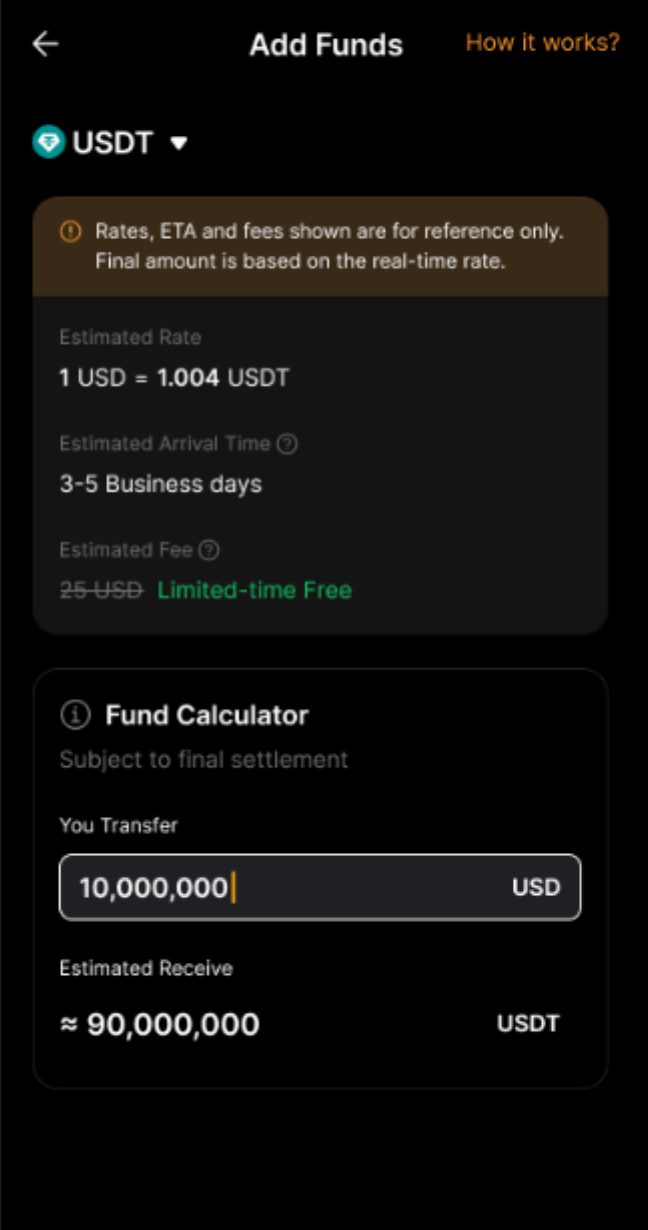
The exchange rate between USD and USDT/USDC typically stays close to 1:1 but may fluctuate slightly depending on market conditions. The final rate is based on the latest exchange rate on our platform.
You'll be able to view the estimated exchange rate and the final amount you'll receive on the transfer page before confirming your transaction.
What fiat currencies and payment methods are supported by Bank Transfer +?
Bank Transfer + currently supports USD only. All transfers are processed via SWIFT. Support for additional fiat currencies and payment methods may be introduced in the future.
Is there a transfer limit for Bank Transfer +?
Yes. Maximum transfer limits apply per transaction, as well as on a daily and monthly basis, depending on your VIP level (see table below). You can also check your exact limits on the transfer page.
There is no minimum transfer amount when using Bank Transfer +. However, please note that all transfers are processed via SWIFT and may incur fees charged by the sending bank and/or intermediary banks. If the transferred amount does not cover these fees, the funds will not be credited.
Are there any fees associated with Bank Transfer +?
Yes, a fixed fee of $25 applies to each add-funds transaction.
For transfer-out requests, processing fees may be charged by the banking partner and any intermediary banks involved. These fees vary by bank. For example, you might be charged $30 by the banking partner and an additional $25 by an intermediary bank.
How long does it take for a transfer via Bank Transfer + to be processed?
Transfers may take up to 5 business days to arrive, depending on your bank's processing time.
Can I add or withdraw funds via Bank Transfer + using someone else's bank account?
Yes, the bank account used for transfers to or from Bank Transfer + does not need to be in your name. Bank Transfer + is a dedicated fiat account solution within Bybit that supports third-party transfers, allowing you to send and receive funds similar to a standard bank transfer.
Why can't I see Bank Transfer + in my Bybit App?
Bank Transfer + is currently available only to Bybit VIP 1 and VIP 2 users in supported countries/regions. If you are an eligible VIP user but still cannot find Bank Transfer + in your app, it may not yet be available in your region.
What happens if my transfer is rejected?
If your transfer is rejected, the funds will be returned to your original account in the original currency. For example, if you transfer USDT from your Funding Account to your bank account in USD, the refund will be credited back to your Funding Account in USDT.
Please note that any fees incurred during the process will not be refunded. The refund may take up to 5 business days to arrive. We strongly recommend ensuring that all details are accurate before initiating the transfer to avoid delays or rejection.
Why do I need to submit additional documents during the transfer process?
Additional verification may be required if the system detects potential security risks or unusual activity on your account or transactions. Please submit the requested documents for further review to help ensure the safety and integrity of your account. The review process typically takes up to 48 hours. You can check the status of your submission in the Support Hub. If processing takes longer than expected, please contact our Customer Support via this form.